
WireGuard Proxy Protocol
Introduction
WireGuard is a modern, lightweight Virtual Private Network (VPN) protocol designed to establish secure, encrypted network connections between devices over untrusted networks, such as the public internet.
It provides a high-performance alternative to traditional VPN technologies by using modern cryptographic algorithms, a streamlined connection mechanism, and a relatively small implementation.
WireGuard operates at Layer 3 (the network layer) of the OSI model and encapsulates IP packets inside encrypted UDP packets. It allows two or more network peers to communicate securely, regardless of their physical location or underlying network infrastructure. It can also be used as the foundation of a proxy VPN service. In this configuration, a client connects to a remote WireGuard server and routes some or all of its internet traffic through that server. The server then forwards the traffic to its intended destination.
An important distinction is that WireGuard is not itself an application-layer proxy protocol. It creates an encrypted network tunnel that can provide proxy-like traffic forwarding at the IP routing level.
Core architecture
WireGuard uses a peer-to-peer architecture in which each participating device is identified by a cryptographic public key.
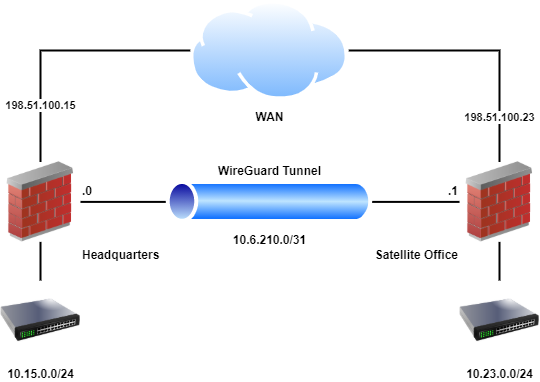
A typical proxy VPN deployment consists of two primary components:
- WireGuard Client: The device initiating the VPN connection. It establishes an encrypted tunnel and sends network traffic through it.
- WireGuard Server: The remote VPN endpoint that authenticates the client, decrypts incoming packets, and forwards permitted traffic toward its destination.
Additional peers can be configured to support multiple clients, site-to-site connections, or distributed network architectures.
Cryptographic foundation specifications
WireGuard uses a fixed collection of modern cryptographic primitives rather than supporting a large collection of configurable encryption suites.
Algorithm | Purpose |
|---|---|
Curve25519 | Elliptic-curve Diffie-Hellman key exchange |
ChaCha20 | Symmetric encryption |
Poly1305 | Message authentication |
HKDF | Cryptographic key derivation |
BLAKE2s | Cryptographic hashing |
SipHash24 | Hash-table key protection |
WireGuard connection establishment
WireGuard connectionsuses areUDP, which is commonly blocked on public networks, such as work or school. This can disrupt applications and services which rely on this proxy protocol technology.
WireGuard uses the Noise_IK handshake pattern to establish secure communication between peers.
The handshake is designed to authenticate the participating devices and derive session encryption keys efficiently.
Before establishing a connection, both peers must have the appropriate cryptographic and network configuration.
The client needs:
- Its own private key
- The server's public key
- The server's network endpoint
- Its assigned VPN IP address
- The permitted destination networks
- An optional pre-shared key
The server needs the corresponding client public key and the permitted VPN addresses associated with that peer.
Understanding handshake and peer authentication
Before two WireGuard peers can exchange encrypted network traffic, they must establish a cryptographically authenticated connection. This process is handled through WireGuard's handshake mechanism, which is based on the Noise Protocol Framework, specifically the Noise_IK pattern.
Unlike traditional VPN protocols that may rely on usernames, passwords, certificates, or a separate authentication authority, WireGuard uses public-key cryptography to identify and authenticate peers.
Each peer possesses a private key and a corresponding public key. The private key must remain confidential, while the public key is distributed to other peers as part of their configuration.
The WireGuard handshake serves several important purposes:
- Establishes the cryptographic identity of the communicating peers
- Authenticates the remote peer using its configured public key
- Establishes fresh symmetric session keys
- Provides forward secrecy through ephemeral key exchange
- Establishes the cryptographic state required for subsequent encrypted packet transmission
The handshake does not itself establish routing or grant unrestricted network access. Those responsibilities remain with the peer configuration and the operating system's networking and firewall components.
Public keys and peer identity
WireGuard identifies peers using their public keys rather than relying on their current IP addresses.
This distinction is important because a peer's network endpoint can change without changing its cryptographic identity.
For example, a mobile client may connect from a residential Wi-Fi network and later switch to a cellular connection. Although its externally visible IP address changes, it remains the same WireGuard peer because its public key has not changed.
The server associates the peer's public key with its configured permissions, including its AllowedIPs entries.
Session-key establishment
During the handshake, WireGuard uses Curve25519-based Diffie-Hellman operations to derive shared secret material.
This material is processed through the protocol's cryptographic key derivation mechanisms to establish symmetric encryption keys.
WireGuard uses ChaCha20-Poly1305 for authenticated encryption of transported packets.
The resulting session keys are used to protect subsequent traffic without requiring an expensive public-key exchange for every packet.
WireGuard also periodically performs new handshakes to refresh its cryptographic session state.
Handshake and data transmissions
Once the handshake has successfully completed, the peers can begin exchanging encrypted transport packets.
These packets contain the original IP traffic that the VPN is designed to carry.
Each transport packet is authenticated and encrypted using the negotiated session keys. Packets that fail authentication are rejected rather than being delivered as valid network traffic.
WireGuard also incorporates mechanisms to prevent replay attacks, ensuring that previously transmitted encrypted packets cannot simply be captured and retransmitted to reproduce valid traffic.
Separating peer identity from network location is one of WireGuard's most useful architectural characteristics.
It allows peers to communicate across changing network environments while retaining cryptographically verifiable identities.
It also reduces the complexity of VPN authentication by eliminating the need for a traditional certificate infrastructure or centralized authentication service in a basic deployment.
However, this simplicity places additional responsibility on administrators to protect private keys, maintain accurate peer configurations, and remove compromised or obsolete peers promptly.
A WireGuard deployment is only as secure as its key management and the network access policies associated with its peers.
Troubleshooting connections through WireGuard
Although WireGuard is designed to be relatively simple and reliable, problems can still occur during configuration, connection establishment, and normal operation. These issues are often related to incorrect peer configurations, network restrictions, routing problems, firewall policies, or DNS resolution.
Understanding how to identify the source of a problem is important when deploying WireGuard as a VPN or proxy-style network gateway.
Handshake failures
One of the first things to investigate when a WireGuard connection fails is whether the peers have successfully completed a handshake.
WireGuard does not maintain a traditional persistent connection in the same way as some other VPN protocols. Instead, peers exchange authenticated handshake messages when communication is required and refresh their cryptographic session keys periodically.
A missing or outdated handshake timestamp may indicate that the peers cannot successfully communicate.
Common causes include:
- Incorrect public keys in the peer configuration
- An incorrectly configured endpoint address or UDP port
- The remote WireGuard service not running
- Firewall rules blocking UDP traffic
- Network restrictions preventing communication with the endpoint
- Incorrect system time or other underlying system issues
On Linux-based distributions, the following command provides a useful overview of the configured peers and their connection state:
sudo wg showThe output includes peer public keys, endpoint information, the latest handshake timestamp, and transfer statistics.
It is important to remember that an absent recent handshake does not necessarily indicate a configuration error. An idle peer may simply have no reason to establish a new session.
Successful handshake but with no internet access
A particularly common problem occurs when WireGuard successfully establishes a handshake, but the client cannot access the internet.
This generally indicates that the cryptographic tunnel is functioning but the network forwarding configuration is incomplete.
Potential causes include:
- IP forwarding being disabled on the server
- Missing or incorrect NAT configuration
- Firewall rules preventing forwarded traffic
- Incorrect routing entries
- The server lacking a valid route to the internet
- Incorrect
AllowedIPsconfiguration
A successful handshake only confirms that the peers can establish authenticated communication. It does not confirm that packets are being forwarded successfully to their intended destinations.
Administrators should therefore examine the routing and forwarding configuration on both sides of the tunnel.
DNS Resolution issues
DNS problems can make a functioning WireGuard connection appear completely unusable.
For example, a client may be able to communicate with external IP addresses but fail to access websites using domain names.
This can happen when DNS requests are not being routed through the tunnel or when the configured DNS resolver is unreachable.
Potential causes include:
- An incorrect DNS server address
- DNS requests being sent through the wrong network interface
- Firewall restrictions affecting DNS traffic
- Missing routes to the configured DNS resolver
- An unavailable DNS service on the remote network
Testing access to an external IP address independently of domain resolution can help determine whether the problem is related to DNS or general network connectivity. Administrators should also consider IPv6 DNS behaviour, particularly when clients have both IPv4 and IPv6 connectivity.
Connectivity and unexpected disconnections
Some WireGuard deployments experience intermittent connectivity, particularly when clients operate behind NAT devices, restrictive firewalls, or unstable wireless networks.
NAT devices commonly maintain temporary mappings for outbound UDP connections. These mappings may expire when no traffic is transmitted for an extended period.
When this happens, a peer behind NAT may become temporarily unreachable until communication is re-established.
WireGuard provides the PersistentKeepalive option to help maintain these mappings:
[Peer]
PublicKey = SERVER_PUBLIC_KEY
Endpoint = vpn.example.com:51820
AllowedIPs = 0.0.0.0/0
PersistentKeepalive = 25
A persistent keepalive interval of 25 seconds is commonly used when maintaining connectivity behind NAT is necessary.
Other possible causes of intermittent connectivity include:
- Unstable internet connections
- UDP filtering or rate limiting
- Network interface changes
- Incorrect endpoint information
- Packet loss along the underlying network path
MTU and Packet Size Problems
Incorrect Maximum Transmission Unit (MTU) settings can cause connectivity problems that are difficult to identify.
Because WireGuard encapsulates original IP packets inside UDP transport packets, additional packet overhead must be accounted for.
When packets exceed the available path MTU, fragmentation or packet loss may occur.
Typical symptoms include:
- Websites loading partially or inconsistently
- Large downloads failing
- Certain applications timing out
- Small packets succeeding while larger transfers fail
- Connections becoming unreliable across particular networks
An MTU of 1420 bytes is a common starting point for many WireGuard deployments, but the appropriate value depends on the underlying network.
Incorrect AllowedIPs configuration
The AllowedIPs parameter is one of the most important parts of a WireGuard peer configuration.
An incorrect value can result in traffic being routed through the wrong peer or rejected because the source address does not match the addresses permitted for that peer.
For example, a full-tunnel client configuration generally requires both IPv4 and IPv6 default routes if both address families are intended to use the VPN:
AllowedIPs = 0.0.0.0/0, ::/0A split-tunnel configuration may instead specify only the remote networks that should be reachable through the VPN.
Administrators should verify that the client and server configurations agree on the intended tunnel address ranges and permitted peer addresses.
Firewall and port restrictions
WireGuard depends on UDP communication between configured endpoints.
If a firewall blocks the configured listening port, the peers may be unable to exchange handshake messages.
Firewall restrictions can also affect traffic after the handshake has succeeded.
For example, a server may accept encrypted WireGuard packets but prevent decrypted traffic from being forwarded to external networks.
When investigating firewall-related problems, distinguish between:
- Traffic reaching the WireGuard listening socket.
- Traffic being accepted through the WireGuard interface.
- Traffic being forwarded between network interfaces.
- Return traffic reaching the original VPN client.
These are separate stages of network communication and may be controlled by different firewall policies.
IPv4 and IPv6 connectivity issues
A WireGuard deployment can experience problems when IPv4 and IPv6 are configured inconsistently.
For example, a client may successfully route IPv4 traffic through the tunnel while continuing to use its ordinary network connection for IPv6.
This can cause unexpected connectivity behaviour and potentially expose traffic that administrators intended to keep inside the VPN.
Administrators should verify that the intended address families are configured consistently across the client, server, routing tables, and firewall policies.
If IPv6 is not supported by the deployment, the network configuration should account for that limitation rather than assuming that IPv4 routing automatically covers IPv6 traffic.
Diagnostic commands
Linux-based distributions provides several tools that can help identify problems within a WireGuard deployment.
The following commands are useful starting points:
Inspect WireGuard peer status:
sudo wg showDisplays configured peers, endpoint information, handshake timestamps, and transfer counters.
Inspect network interfaces:
ip addrDisplays configured network interfaces and their assigned addresses.
Inspect routing tables:
ip routeDisplays IPv4 routing information and helps identify where packets are expected to travel.
For IPv6 routing information:
ip -6 routeInspect IP forwarding:
sysctl net.ipv4.ip_forwardChecks whether IPv4 packet forwarding is enabled.
Inspect system service logs:
sudo journalctl -u wg-quick@wg0Displays service logs for a WireGuard interface managed through wg-quick.
Inspect UDP listening sockets:
sudo ss -ulnpDisplays UDP sockets and listening services, helping verify whether the expected WireGuard service is bound to a local port.
The exact commands and service names may vary depending on the operating system and how WireGuard was installed.
Systematic troubleshooting
When diagnosing a WireGuard deployment, it is generally more effective to investigate problems in stages rather than changing multiple configuration settings simultaneously.
A useful troubleshooting sequence is:
- Verify that the WireGuard interface is running
- Check the peer configuration and public keys
- Inspect the latest handshake timestamp
- Verify that the configured UDP endpoint is reachable
- Confirm that the expected tunnel addresses are assigned
- Inspect AllowedIPs and the operating system routing tables
- Verify IP forwarding and firewall policies
- Check NAT and return-routing configuration where applicable
- Investigate DNS resolution and IPv6 behaviour
- Examine MTU settings if connectivity remains inconsistent
Changing one variable at a time makes it easier to identify the actual cause of a problem and reduces the possibility of introducing additional configuration errors.
Concluding troubleshooting
Most WireGuard connectivity problems are not caused by the cryptographic protocol itself. They are more commonly associated with the surrounding network infrastructure, including routing, firewall policies, DNS configuration, NAT, and UDP transport restrictions.
Understanding the distinction between establishing an encrypted tunnel and successfully forwarding traffic through that tunnel is essential when diagnosing problems.
By examining peer status, handshake information, routing tables, and system logs, administrators can isolate most common configuration and connectivity issues without unnecessarily rebuilding their WireGuard deployment.
About this article
- Written by Gary Phatt, a TheOpenRoad Support employee.
- Still need help? Please write to us in the comment section below or contact TheOpenRoad support.

Please rate your experience with this article today:
When you select a number, 1 being the lowest and 9 being the highest; the page will refresh and your feedback will be submitted to TheOpenRoad.